Android 13 update tracker: release date, features, supported devices, and more

Android 13 release date, features, supported devices list, codename, and more have been doing the rounds off the internet ever since Google announced the developer preview of the OS back in February. The Android 13 is believed to be the successor of Android 12, which introduced one of the biggest design overhauls the OS has seen since the Android 5.0 release with the Material You design language. While the Smartphone OEMs including Samsung, OnePlus, Xiaomi and others continue to push Android 12 on their devices, Google has already started testing the next iteration of its widely popular OS. Let’s take a look at the new things Android 13 will bring to the table.


Android 13 release date
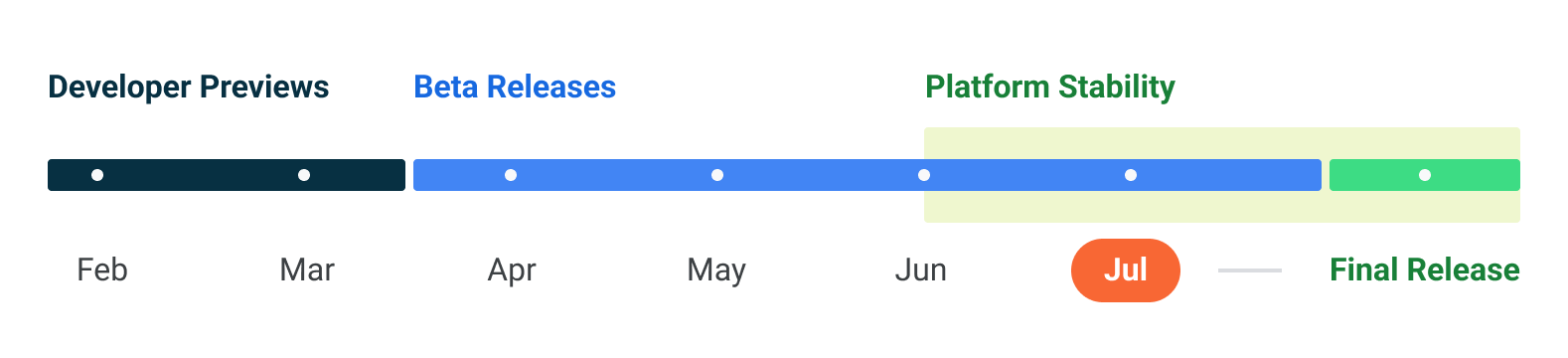
Google has officially introduced its next-gen mobile OS Android 13. The search giant announced the fourth public beta of the operating system (OS) at its Google I/O 2022 keynote. Dubbed as the Android 13 beta 4, the build is available on Pixel 4 or later devices and a bunch of other flagships, including OnePlus 10 Pro, Asus Zenfone 8, Lenovo P12 Pro, Nokia X20, Oppo Find N, Oppo Find X5 Pro, Realme GT 2 Pro, Vivo X80 Pro, Xiaomi 12 series, and Tecno Camon 19 Pro.
This beta 4 update will be followed by the Android 13 Platform Stability build, which will comprise the final SDK and BDK APIs of the OS, and the final release sometime in August or September.
Android 13 features
Just like the previous version of Android, Google is adding many new features to the Android 13 platform. There are Material You changes, privacy and security features, new Project Mainline module additions, new behaviour for background apps, and more.
New Photo picker, permission, and alert

To improve the privacy and security of Android users Google is introducing a new Photo picker. Android 13 will add a new system photo and video picker that allows users to share the required photos and video without giving target apps permission to access all device files. The private photo picker will come as an extension to the document picker UI which allowed sharing of files without granting the apps the permission to view all files. Google plans to bring this functionality to older devices as well through an update to the MediaProvider module via Google Play system updates on devices running Android 11 and above.
The OS will also allow users to choose between “Photos and Videos” and “Music and Audio” when an app asks for permission for file access. Android 13 will show you more alerts whenever an app access something in the background, even something as small as an app accessing your clipboard.
A more private Nearby Device permission for Wi-Fi
Previously if the apps wanted to search for nearby devices, apps had to turn on the Wi-Fi along with the location permission. This is changing with Android 13. Google is introducing a new way for apps to find nearby devices without needing to access the location with the new NEARBY_WIFI_DEVICES runtime permission.
App icon theming

Google is iterating on the Material You theming to include app icons as well. Apps can now change their icons based on the wallpaper and other theming settings currently active on the user’s device. Previously apps could only adapt the Material You theming just in the app’s UI, but as you can see in the above image, we are getting some interesting changes to app icons behaviour in Android 13. But there’s a caveat here, Google is asking developers to add a monochromatic app icon and a change to the adaptive icon XML. So, convincing all the developers to comply with this new theming system might be going to take a bit of time just like what happened with the Adaptive icons situation on Android 8.
Improving per-app language settings
To help multilingual users, Google will be adding a new feature where users can select the desired language on a per-app basis. What this means is users will be able easily to select the app language which is different from the current system language. Developers can use the new platform API to easily get the default system language or set the user desired language in their app, for an improved experience.
New Project Mainline modules
Google will be adding a new Project Mainline Bluetooth and Ultra-wideband module. Project Mainline was launched with Android 10 with hopes to modularize Android components so Google can update them automatically via Google Play system updates, without any interruptions required from the OEMs. Previously, Android 12 added Android Runtime (ART) module as a major updatable part, and it is good to see Google continuing the tradition with Android 13.
Bluetooth LE Audio
Android 13 will see the addition of Bluetooth LE Audio to enable high fidelity audio streaming without consuming too much battery that high-resolution audio streaming usually demands. This will be an interesting addition as most wireless earbuds don’t have a battery life that can be called impressive. Google notes that it is adding this functionality on top of Bluetooth LE, so if the device had Bluetooth LE capabilities previously, users can expect to get this functionality when they update their devices to Android 13.
MIDI 2.0
Another functionality users can expect to see on Android 13 is the support for the MIDI 2.0 standard. MIDI 2.0 standard will enable “features such as increased resolution for controllers, better support for non-Western intonation, and more expressive performance using per-note controllers.” says Google.
More control over app notifications
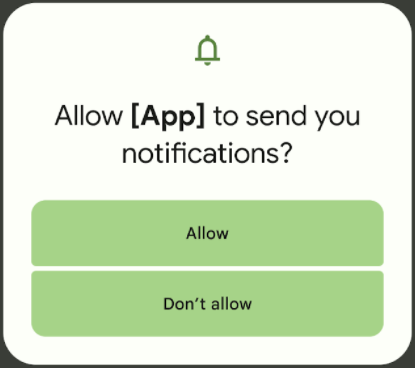
To bring the unwanted app notification under control, Google is adding new runtime permission notifications. Developers will now be required to ask for user permission before they can send notifications to users. Google is requesting the developers target Android 13 as soon as possible, to make the transition as smooth as possible. And, for apps targeting Android 12L or lower, the system will handle the notification permission on behalf of the developer.
Developer downgrade permissions
To preserve user privacy, Google introduced the ability to automatically revoke app permissions if the user stops interacting with the app after a few months in Android 12. With Android 13, Google is adding a similar feature where the developers can choose to automatically revoke the specific app permissions after the said task is achieved.
Improved Japanese text wrapping
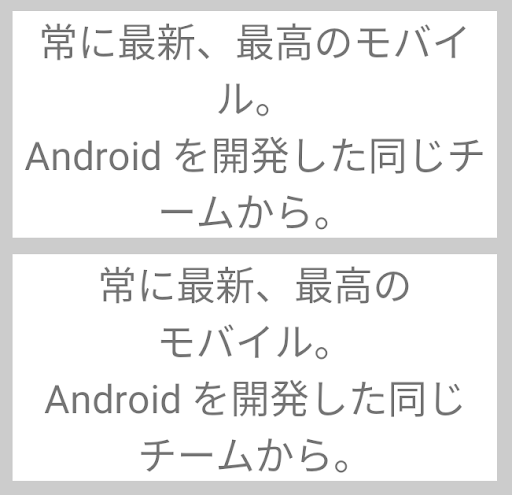
Google is introducing improved text wrapping for Japanese text in Android 13 so developers can make improved apps. This is what Google says about the new feature “TextViews can now wrap text by Bunsetsu (the smallest unit of words that sounds natural) or phrases — instead of by character — for more polished and readable Japanese applications.”
DNS over HTTPS support
Android has supported DNS over TLS support since Android 9 with Private DNS functionality. Now it seems Google is also bringing DNS over HTTPS support with the Android 13 update according to the Esper blog by Mishal Rehman. Support for DNS over HTTPS means that DNS queries now respond through the HTTP or HTTP/2 protocol. This would bring many improvements such as faster response times and many other utility features. The functionality is currently in testing and works via the DNS Resolver module.
App drawer in Taskbar for tablets

Android 12L only had 6 app icons in the Taskbar UI on big screens such as tablets for instance. Now Google has added an App drawer button in the Taskbar, which when clicked shows you a pop-up of the whole App drawer as if you were accessing the real App drawer and even lets you launch apps from there.
Support for HDR video in Camera2 API, new media controls, unified Security & Privacy section in Settings, and more
Apart from the above feature list, Google is also testing a slew of other features and improvements. According to the Esper blog by Mishal Rehman Google is testing the following features including HDR video support in Camera2 API, resolution settings to save battery, and Fast Pair availability in AOSP. Android 13 also includes a new unified Security & Privacy section on the Settings page that will show users easy-to-understand colour-coded indicators of their device’s safety status and how users can improve it.
Android 13 also features 3D wallpapers with Cinematic effects, dark mode for bedtime, revamped screen savers for tablets, QR code shortcuts in Settings, and new media controls. Google is also making changes to Clipboard behaviour on Android 13 to protect users’ privacy. The Clipboard data will now automatically be cleared after 1 hour. The Dynamic System Updates are also getting faster. Google is also testing a bandwidth throttling feature in the Developer options that will let you control the internet speeds.
Android 13 supported devices
Android 13 Beta is already available for download on several Pixel devices. So we can expect that the following Pixel devices will get the Android 13 update.
- Pixel 6 Pro
- Pixel 6
- Pixel 5a 5G
- Pixel 5
- Pixel 4a (5G)
- Pixel 4a
- Pixel 4 XL
- Pixel 4
OnePlus
- OnePlus 10 Pro
ASUS
- ASUS ZenFone 8
OPPO
- OPPO Find X5 Pro
Realme
- Realme GT2 Pro
Vivo
- Vivo X80 Pro
Xiaomi
- Xiaomi 12 and 12 Pro
Samsung
These Samsung devices are likely to get Android 13 update
Samasug Galaxy S series
- Samsung S22
- Samsung S22 Ultra 5G
- Samsung S22+ 5G
- Samsung S21
- Samsung S21
- Samsung S21+ 5G
- Samsung S21 G FE 5G
- Samsung S21 Ultra 5G
- Samsung Galaxy S10 5G
- Samsung Galaxy S10+
- Samsung Galaxy S10
- Samsung Galaxy S10e
- Samsung Galaxy S10 Lite
Samsung Galaxy A series
- Samsung Galaxy A73
- Samsung Galaxy A53
- Samsung Galaxy A33
- Samsung Galaxy A51
- Samsung Galaxy A71
- Samsung Galaxy A51 5G
- Samsung Galaxy A71 5G
- Samsung Galaxy A90 5G
Samsung Galaxy Galaxy Z series
- Samsung Galaxy Z Fold3
- Samsung Galaxy Z Flip3
- Samsung Galaxy Z Fold2 5G
- Samsung Galaxy Z Fold2
- Samsung Galaxy Z Flip 5G
- Samsung Galaxy Z Flip
- Samsung Galaxy Fold 5G
- Samsung Galaxy Fold
Galaxy Tab S series
- Samsung Galaxy Tab S8
- Samsung Galaxy Tab S8+
- Samsung Galaxy Tab S8 Ultra
- Samsung Galaxy Tab S7+ 5G
- Samsung Galaxy Tab S7+
- Samsung Galaxy Tab S7 5G
- Samsung Galaxy Tab S7
- Samsung Galaxy Tab S6 5G
- Samsung Galaxy Tab S6
- Samsung Galaxy Tab S6 Lite
Samsung Galaxy Note series
- Samsung Galaxy Note20 Ultra 5G
- Samsung Galaxy Note20 Ultra
- Samsung Galaxy Note20 5G
- Samsung Galaxy Note20
- Samsung Galaxy Note10+ 5G
- Samsung Galaxy Note10+
- Samsung Galaxy Note10 5G
- Samsung Galaxy Note10
- Samsung Galaxy Note10 Lite
LG
LG’s Korean website and German website have revealed the Android 13 rollout plan. Here is the list of LG devices getting Android 13. Do note that as this information is from Korean and German websites, the list might also include the devices not launched in India.
- LG Wing
- LG Velvet
- LG Velvet LTE
Android 13 codename, beta, developer preview update
While Google has publicly shelved the practice of naming Android versions after desserts, according to several reports, it seems the Android 13 is internally named “Tiramisu”. So, it is good to know that our beloved Android is still getting named after desserts, at least internally. Google has already released two Developer Previews of Android 13, and Google is further expected to release at least three more Beta releases before reaching the Platform Stability milestone sometime in Q3 of 2022.
You can already install the Developer Preview on Pixel devices, and if you don’t have a Pixel device lying around, Google recommends you install the available 64-bit images on Android Emulator in Android Studio. Google has also provided GSI images so you can install Android 13 Developer Preview on compatible devices which allow GSI images. It is worth noting that, though you can install the developer preview on a range of devices, they are not meant for daily use, Google primarily provides these Previews for testing purposes. You can find the complete Android 13 installation guide for Pixel devices and Android Emulator here. For more information on Android releases, including Preview and Beta updates, you can follow the Android Developers blog.
Android 13 news
DNS-over-HTTP/3 functionality started rolling out (July 20th)
Google has started rolling out the DNS-over-HTTP/3 functionality as part of an update to the Google Play system. In fact, Google notes on its Security blog (via) notes that most devices running Android 11 and up should have already got the update, and DNS queries should automatically latch on to this new protocol when using Google DNS and Cloudflare DNS. Google is also working to add compatibility with more service providers soon. With this, we can be sure that Android 13 when it officially launches, will support the DNS-over-HTTP/3 protocol.
Android 13 final Beta 4 update with bug fixes starts rolling out (July 14th)
Google has started rolling out the final release candidate, the Beta 4 update for Android 13. The update is now available on Pixel devices and on Android Emulator for developers to test their apps. With this Google notes that we are just a “few weeks away” from the official Android 13 launch. Following are a few fixes included in Android 13 Beta 4:
- Fixed an issue where on some devices, paired Bluetooth devices could be observed to rapidly connect and disconnect from the device.
- Fixed an issue where the Google Camera app occasionally crashed on Pixel 6 and Pixel 6 Pro devices.
- Fixed an issue where, when a user checks for system updates by navigating to Settings > System > System update, the system incorrectly reported Android 12 as the device’s Android version, even when the device was already successfully updated to an Android 13 build.
- Fixed an issue on Pixel 6 and Pixel 6 Pro devices where the Now Playing page sometimes got stuck on Downloading song database.
Android 13 Beta 3.3 update with bug fixes starts rolling out (July 11th)
A new beta update for Android 13 has started rolling out for compatible Pixel devices. It’s an incremental update that fixes a whole bunch of issues, including slow UI rendering, inability to connect to a Wi-Fi network, and system UI crashes, among other things. Here’s a list of Android 13 Beta 3.3 features
- Fixed an issue with the Pixel launcher where if the Always show keyboard option was enabled for the app drawer, then when the user closed the app drawer and opened an app folder on the Home screen, the keyboard was erroneously shown as well.
- Fixed an issue where in some cases, such as gesturing to go back, the system UI crashed.
- Fixed an issue where devices couldn’t connect to a WiFi network in some cases even when the network was available and the signal strength was good.
- Fixed an issue where the BluetoothManagerService continued to try and bind to the TBSservice even when bluetooth.profile.ccp.server.enabled was false, leading to slow performance and cold starts for apps.
- Fixed an issue where in some cases after a device was plugged in to charge (for example, overnight), the device would become unresponsive until it was rebooted.
- Fixed a kernel issue with lib/list_debug.c that caused a kernel panic in certain cases on some devices.
- Fixed an issue with the Connectivity Thermal Power Manager that caused slow UI rendering, unresponsiveness in apps, and poor battery performance in some cases.
Android 13 Beta 2 announced at Google I/O 2022 (May 11th)
Google has announced the Android 13 Beta 2 build for Pixel and a handful of non-Pixel devices. Interested users can download the build by visiting the Google Android beta website.
Android 13 Beta 1 for Google TV announced (May 9th)
In addition to Android TV, beta testing Android 13 for Google TV has also begun. The beta update can be installed on the ADT-3 Developer Kit.
Android 13 beta is out (April 26th)
Google has released the first beta of Android 13 to eligible Pixel phones. This comes just days before the OS official release date. The Android 13 official features will be introduced at Google I/O 2022 event, which is scheduled for May 11th and 12th.
The post Android 13 update tracker: release date, features, supported devices, and more first appeared on 91mobiles.com.
https://ift.tt/TxhstEU
https://ift.tt/SbycMPn


No comments